Code CR4100 Quick Start Uživatelský manuál Strana 6

  • Stažení
  • Přidat do mých příruček
  • Tisk
  • Strana
    / 14
  • Tabulka s obsahem
  • KNIHY
  • Hodnocené. / 5. Na základě hodnocení zákazníků
Zobrazit stránku 5
C006244_01_CR4100_QuickStart_Guide
2.0 - Inserng the Baery
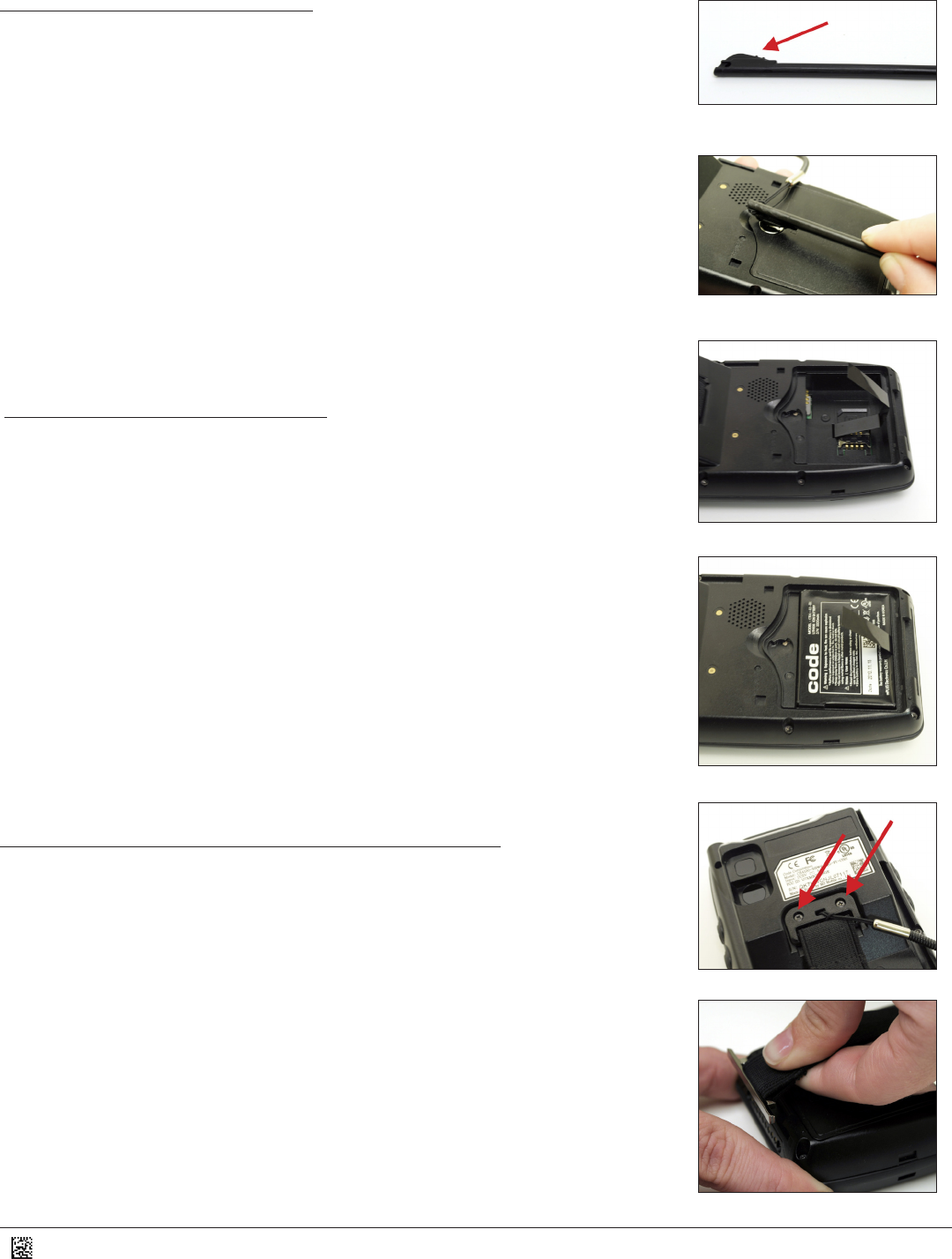
1. Using the at poron of the stylus (Figure 1), insert the tool into the slot on the baery
cover located on the back of the unit (Figure 2). Rotate the slot clockwise from LOCK to
UNLOCK.
2. Making sure a poron of the strap is exposed (Figure 3), insert the baery such that
the contacts of the baery are aligned with the pins inside the CR4100 (Figure 4).
3. Place the cover back on the CR4100.
4. Using the at poron of the stylus, rotate the slot counterclockwise from UNLOCK to
LOCK (see Figures 1 & 2).
2.1 - Removing the Baery
1. Using the at poron of the stylus (Figure 1), insert the tool into the slot on the baery
cover located on the back of the unit (Figure 2). Rotate the slot clockwise from LOCK to
UNLOCK.
2. Pull on the strap, and the baery will pop out.
3. Insert a new baery, or leave empty (see Secon 2.0 - Inserng the Baery).
4. Place the cover back on the CR4100.
5. Using the at poron of the stylus, rotate the slot counterclockwise from UNLOCK to
LOCK (see Figures 1 & 2).
2.2 - Aaching/Removing the Hand Strap
1. To aach the hand strap, using a Philips head screwdriver and supplied screws, aach
the top poron of the hand strap to the back of the CR4100 (Figure 5).
2. Slide the plasc key on one end of the hand strap into the slot on the boom of the
CR4100 (Figure 6).
3. To remove the hand strap, slide the plasc key on the end of the handstrap out of
the slot at the boom of the CR4100 (Figure 6) and use a Philips head screw driver to
remove the screws in the top poron of the hand strap (Figure 5).
Figure 1
Figure 2
Figure 3
Figure 4
Figure 5
Figure 6
2
Zobrazit stránku 5
1 2 3 4 5 6 7 8 9 10 11 12 13 14

Komentáře k této Příručce

Žádné komentáře