Code CR4100 Quick Start Uživatelský manuál Strana 11

  • Stažení
  • Přidat do mých příruček
  • Tisk
  • Strana
    / 14
  • Tabulka s obsahem
  • KNIHY
  • Hodnocené. / 5. Na základě hodnocení zákazníků
Zobrazit stránku 10
C006244_01_CR4100_QuickStart_Guide
7
6. Click on the Data Matrix icon.
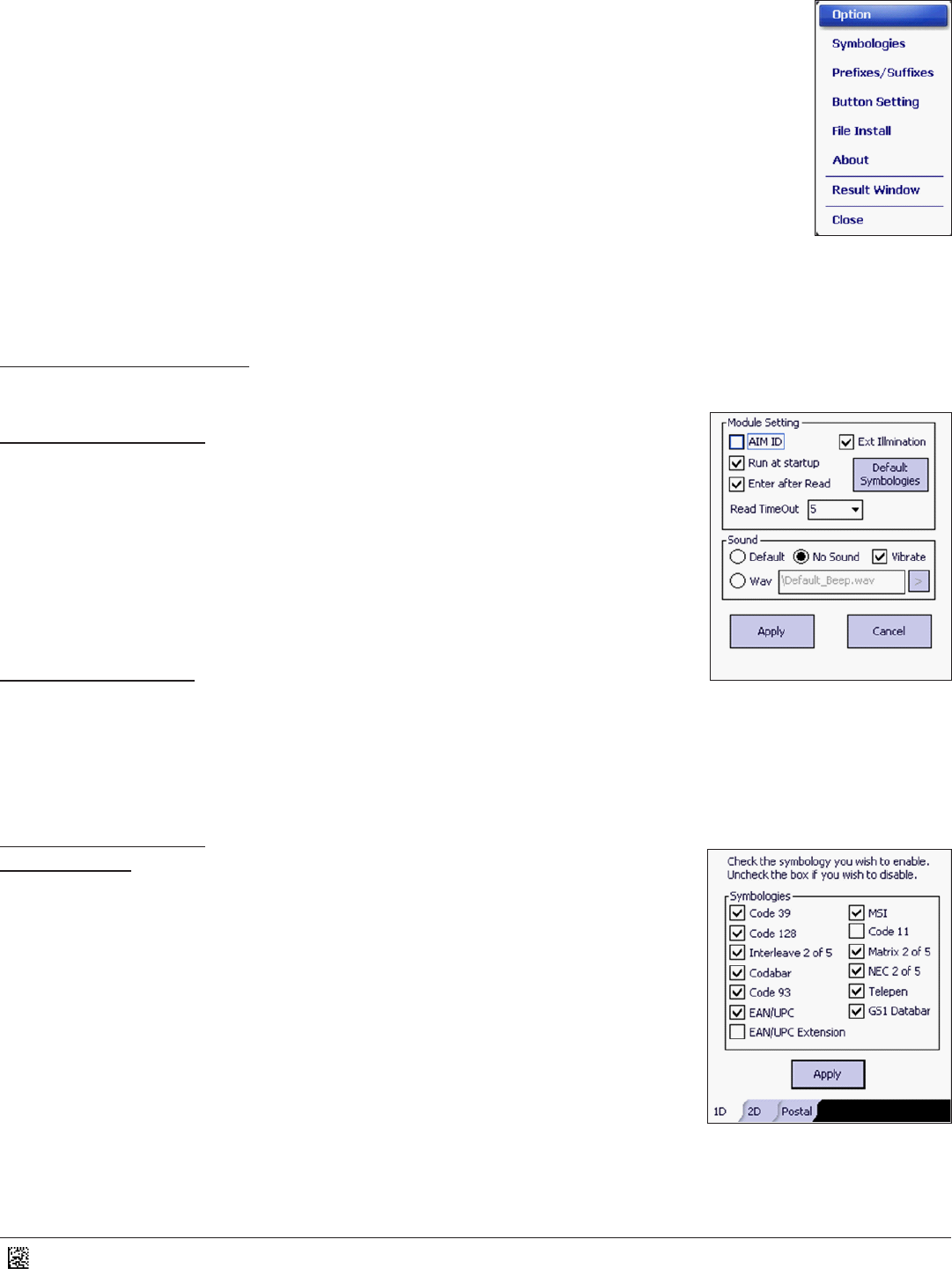
7. A pop-up will appear with the following tles (Figure 18). Click on any of these items to change the
conguraon sengs.
Opon
Symbologies
Prexes/Suxes
Buon Seng
File Install
About
Result Window
Close
3.1 - Opon Sengs
Click on Opon in the list to change the Module and Sound Sengs (Figure 18)
Module Sengs (Figure 19):
AIM ID – Click to Enable/Disable AIM IDs
Ext Illuminaon – Click to Enable/Disable External Illuminaon. This opon should be Enabled.
Run at startup – Click to Enable/Disable Run at startup.
Enter aer Read – Click to Enable/Disable an enter key to be added aer a good read.
Default Symbologies – Click on this box to reset all symbologies to the Default sengs.
Read Timeout – Select a value for the amount of me (seconds) to try for a good read.
Output – Click on this opon to change the output sengs to keyboard.
Sound Sengs (Figure 19):
Default – Beep tone on a good read.
No Sound – There is no tone on a good read.
Wav – Select a wav le to be played on a good read.
Vibrate – Click to Enable/Disable a vibraon on good read. This opon funcons independent of the 3 opons above.
3.2 - Symbologies
1D Tab (Figure 20)
Code 39 – Click to Enable/Disable Code 39
Code 128 – Click to Enable/Disable Code 128
Interleave 2 of 5 – Click to Enable/Disable Interleaved 2 of 5
Codabar – Click to Enable/Disable Codabar
Code 93 – Click to Enable/Disable Code 93
EAN/UPC – Click to Enable/Disable EAN/UPC
EAN/UPC Extension – Click to Enable/Disable EAN/UPC Extension
MSI – Click to Enable/Disable MSI Plessey
Code 11 – Click to Enable/Disable Code 11
Matrix 2 of 5 – Click to Enable/Disable Matrix 2 of 5
NEC 2 of 5 – Click to Enable/Disable NEC 2 of 5
Telepen – Click to Enable/Disable Telepen
GS1 Databar – Click to Enable/Disable all types of GS1 Databar (formerly known as RSS)
Figure 18
Figure 19
Figure 20
Zobrazit stránku 10
1 2 ... 6 7 8 9 10 11 12 13 14

Komentáře k této Příručce

Žádné komentáře

Jensen Multimedia manuali utente

La lista di Jensen Multimedia prodotti contiene 1 manuali utenti per 1 modelli. Tutte le guide utenti pdf sono disponibili per essere scaricate o visionate online.

Cliccare su un alfabeto di seguito per far scorrere la lista completa dei modellif models starting with that letter

Modelli Tipo di Documento
VM9114
Manuale Utente   Jensen VM9114 User Manual, 45 pagine