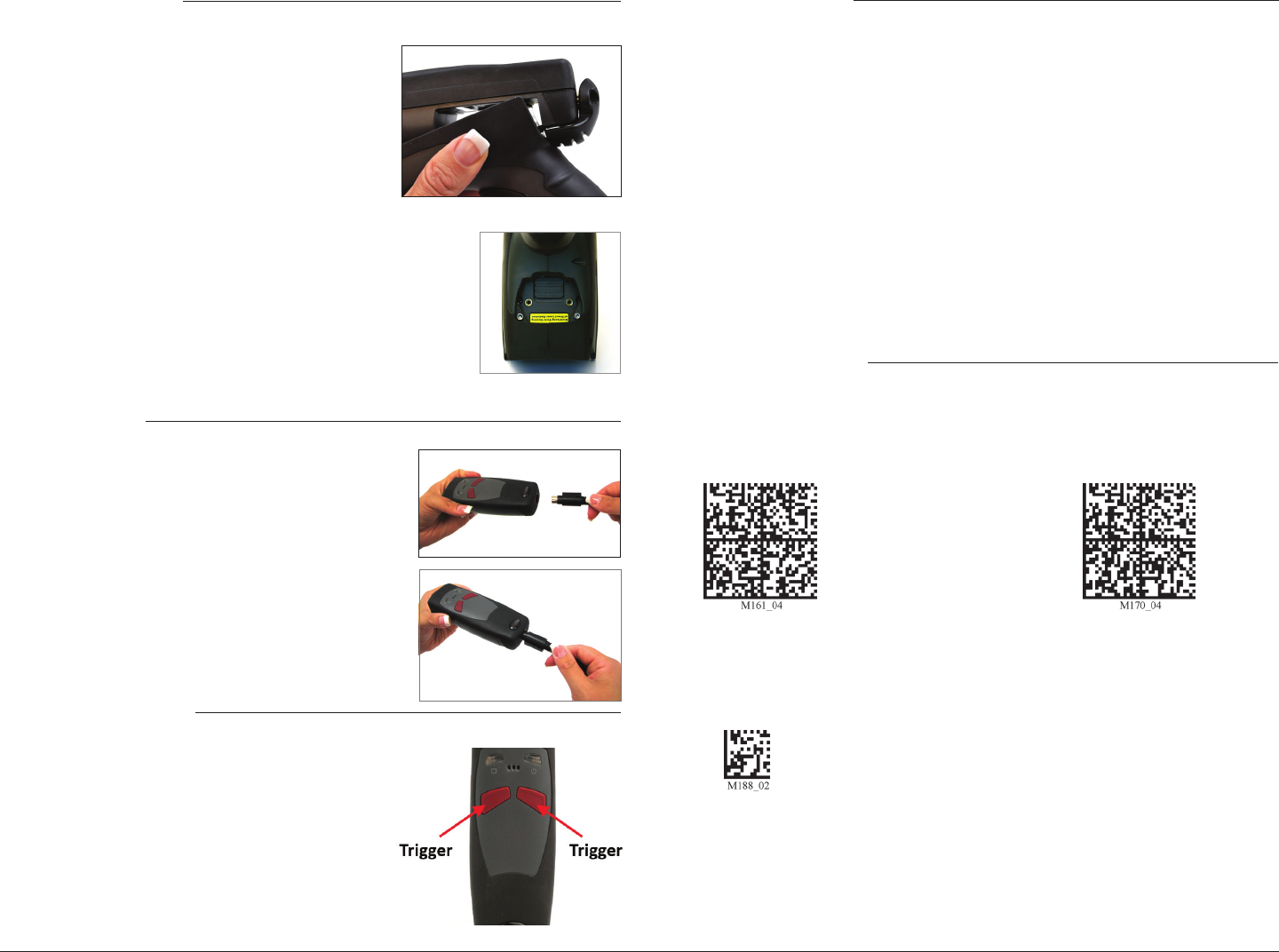
Installing a H2 Handle
1. Push the 8-pin DIN connector at the end of the reader
into the exible connector at the end of the handle.
2. Gently push the reader back, unl the tab on the
handle sits in the recessed slot on the reader. Press
the reader down towards the handle unl it snaps
into place. Oponally, the reader can be further
secured to the handle with two threaded screws on
the underside of the reader and handle (screws are
included with Handles).
3. To detach the H2 Handle, slide the locking mechanism
on the reader up, pull the 8-pin DIN connetor out
and away from the reader, and pull the reader up and
away from the tab on the handle.
Powering On a CR2500
1. Line up and push the 8-pin DIN connector into the
reader (or handle), plug the USB or RS232 end of the
cable into the computer, and plug the Power Supply
(with RS232 cables only) into a wall socket.
2. To power on a CR2500, press and hold either trigger
buon for approximately one second.
The default seng on the CR2500 has Sux Enter disabled. To enable the Sux Enter for
USB and Carriage Return/Line Feed for RS232 scan the conguraon code, followed by the
Save Sengs (M188_02) bar code:
CR2500 Default Sengs
Codabar
Codablock F
Code 11
Code 39
Code 39 Short Margin
Int 2 of 5
PDF417
Telepen
UPC
UPC Short Margin
UPC-E Expansion
Code 39 Triopc
Code 93
Code 128
Code 128 Short Margin
Data Matrix
The CR2500, out of the box, will read the following bar codes:
To congure a CR2500 to read bar codes not listed, please download the CR2500 User Manual
from www.codecorp.com and scan the appropriate ‘Enable’ bar code reading symbology
conguraon code.
Sux Enter Conguraon
Enable Sux Enter - USB Enable Carriage Return/Line Feed - RS232
For more conguraon opons, including disabling the Sux Enter conguraon, download the
CR2500 User Manual from www.codecorp.com.
2
3
The cable has a locking mechanism that will rmly hold the
cable in place. To detach the cable, pinch the plasc on the
8-pin DIN and pull back to disengage the connector.
Installing a Cable
Line up the 8-pin DIN connector into the back end of the
unit, or boom of the handle. The arrows on the connector
should be facing down. When the two items are aligned,
rmly push the cable into the reader.
Scan the Save Sengs code to save the Sux Enter Conguraon.
Save Sengs

 (62 stránky)
 Manymanuals.com
 Manymanuals.de
 Manymanuals.fr
 Manymanuals.it
 Manymanuals.pl
 Manymanuals.cz
 Manymanuals.es
 Manymanuals-pt.com
Komentáře k této Příručce